Stop shipping air.
And stop finding out at the dock. Plans optimized in 3D and checked against the door, the axles and the crush limits — before the truck leaves, not after.
Live numbers — computed by the optimizer in your browser right now.
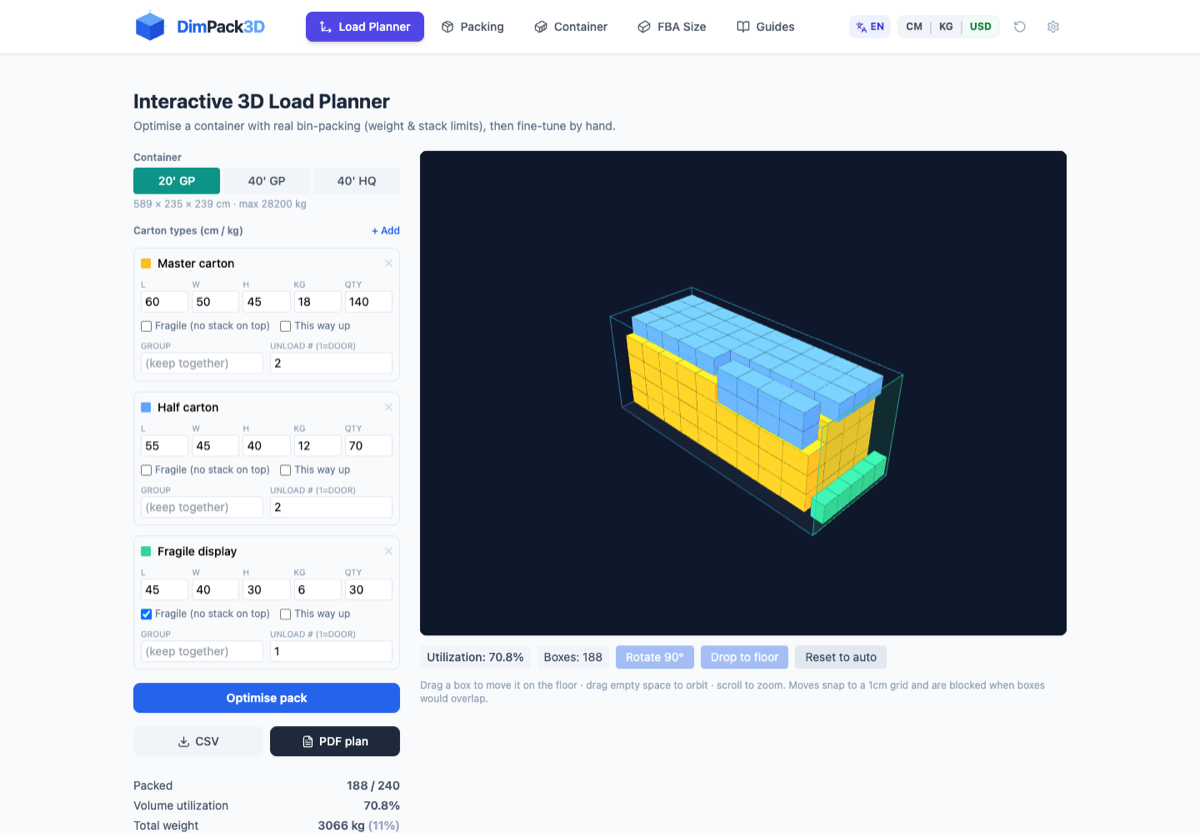
Drag a box to move it · arrows nudge · R rotate · Del delete · ⌘Z undo · drag empty space to orbit · scroll to zoom. Moves snap to a 1cm grid and are blocked when boxes would overlap.
The problems that surface at the last step
None of these are hypothetical. They happen to mature, experienced teams — at the dock, at the weighbridge, at delivery — exactly when fixing them costs the most. Every one is catchable at planning time.
"The pallets were planned against the container's internal height — they don't clear the door header."
💸 Restuffing at the port, per-diem charges, a missed vessel.
The door opening sits ~10 cm below the ceiling (2.28 m vs 2.39 m), and the forklift still needs room to lift and tilt. We check every carton against the DOOR while you plan.
Door clearance"The truck is legal on gross weight — and still gets cited. The rear axle group is over."
💸 A weigh-station citation, then offloading at a transload yard to redistribute.
Axle-group violations are among the most common weigh-station citations. Every carton's weight splits kingpin vs tandems by the lever rule, live, as you drag.
Axle loads"The consignee filed a damage claim — the bottom layer buckled somewhere at sea."
💸 Industry analyses trace roughly two-thirds of intermodal cargo claims to poor packing — and Amazon rejects overhanging pallets outright.
Crush limits per carton from the board grade (McKee), heavy-over-light warnings, and pallet-overhang flags — all live while you plan.
Crush & stacking"The aisle was measured for straight travel — the truck can't make the right-angle turn into the rack bay."
💸 Re-slotting a live warehouse with full racks.
Right-angle stacking needs more room than straight travel — a classic layout mistake. We check the straight width AND the 90° turn box separately; tight corners flag red before you commit.
Right-angle turnsOne tool for every level of the load
Fill a container
Optimize mixed cartons in 3D, drag to adjust, export the plan.
OpenSize a carton
How many units fit per carton, and what each unit costs to ship.
OpenPick a container size
Instant carton count & CBM for 20GP / 40GP / 40HQ.
Open BetaArrange the warehouse floor
Pallet rows, forklift aisles, and live dock-reachability checks.
OpenCheck Amazon FBA fees
2025 size tiers and fulfilment fee estimates for your product.
OpenFree shipping & warehouse calculators
Quick single-purpose tools — no signup. Every one shows its formula and assumptions, and works in metric or imperial.
CBM Calculator
Carton → total cubic meters, container fit & air chargeable weight.
Dimensional Weight Calculator
Billable / DIM weight for FBA, UPS, FedEx, DHL & air freight.
Pallet Calculator
Cartons per pallet, layers, and pallets needed for an order.
Pallet Storage Cost Calculator
Estimate 3PL / warehouse storage cost per pallet, per month.
Warehouse Space Calculator
Pallet count → floor area in square footage and m².
Forklift Aisle Width Calculator
The right-angle stacking aisle your forklift really needs.
Cartons in, load plan out
If you can drag a box, you can plan a container.
Type your cartons, hit Optimise
- Sizes, weights, quantities — mark fragile or this-way-up
- Real bin-packing fills the container, respecting weight & stacking limits
- Then drag any carton in 3D — moves snap to grid and never overlap
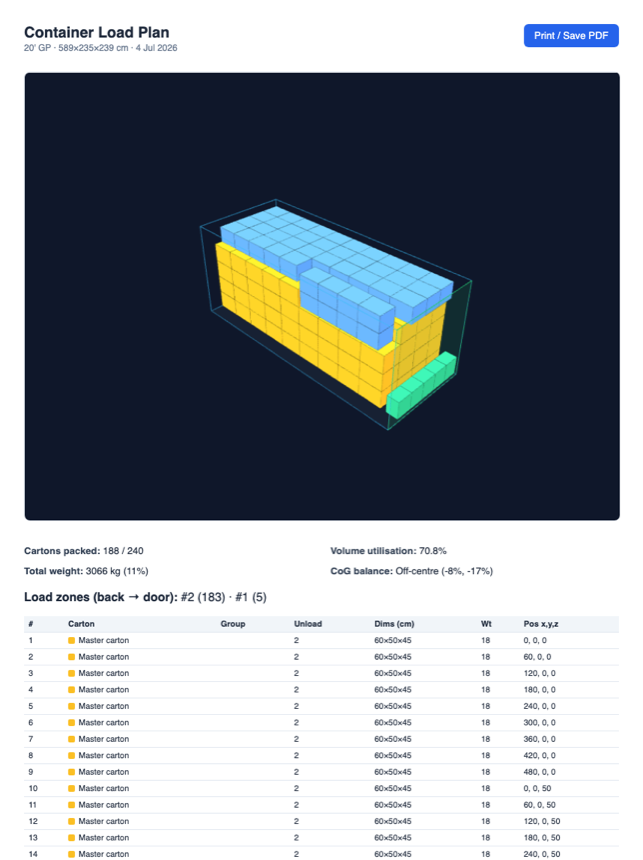
Export a plan your warehouse can follow
- PDF load plan — 3D snapshot, stats, load zones
- CSV packing list — every carton with its exact position
- The deliverable commercial tools charge $350–$5,000/yr for
Watch the checks fire
Real product, real engine — recorded straight from the browser, no staging. Every drag re-runs the physics.
Warehouse: click a pallet — the forklift route and clearance band draw themselves; drag it across an aisle and cut-off stock flags red instantly.
Container: a packed 20' GP — drag any carton and collisions, stacking rules and stats re-check on every move.
Or start from a real scenario
One click loads the full example — cartons, constraints, everything.
One engine. One plan. Every layer of your team.
The bin-packing engine and its reality checks sit at the core. Around it, the same plan becomes what each person actually needs — nobody re-types anything.
The planner
Imports the carton list from Excel, optimizes in 3D, drags to fine-tune — every move re-checked live.
The manager
Gets a review link — approve or request changes, with a full audit trail of who changed what.
The loading crew
Gets the numbered loading sheet — #1 first, back of the container, floor level. Taped at the door.
The paperwork
VGM (cargo + tare), axle splits and weights come off the same plan — no side calculations.
Not a CBM toy — a load-planning engine
| Spreadsheet | DimPack3D | Commercial | |
|---|---|---|---|
| 3D bin-packing | ✗ | ✓ | ✓ |
| Weight & stack limits | ✗ | ✓ | ✓ |
| Drag-edit in 3D | ✗ | ✓ | some |
| PDF plan + packing list | ✗ | ✓ | ✓ |
| Price / year | $0 | $0 | $350–5,000+ |
Every placement must pass:
- Full 3D collision check — no overlaps, ever
- ≥60% base support — nothing floats
- Stack loads propagate down and respect per-carton limits
- Container payload enforced (28.2t / 26.7t / 26.5t)
- Heavy cartons first — centre of gravity stays low, with live balance warning
Reality checks — what the floor actually fights with
A plan that ignores the door, the corner, the axle or the slab is a drawing, not a plan. These checks run live on every layout — most tools don't have them.
The most common loading mistake: planning against the 239 cm interior when the door header is 228 cm. Cartons that can't pass the door are flagged while you plan.
Straight aisle width and the square a forklift needs to TURN are different numbers. Straight-line reachable but corner-blocked pallets turn red.
Every carton's weight splits kingpin vs rear axles by the lever rule — live totals against legal limits, with fix direction.
Max load on top per carton — estimable from ECT board grade (McKee formula), enforced down through the stack.
A 4-level rack bay is 2.4 t on 3 m². Pick your slab rating (mezzanine to heavy slab) — overloaded spots turn red.
Overhang costs ~30% compression strength, and Amazon rejects overhanging pallets outright. Allow 2.5 or 5 cm per side — we pack it AND warn you.
Chilled, frozen or hazmat cargo outside its matching zone turns red the moment you drop it.
CoG height over 55% or a carton ≥25% heavier than the one beneath it — the loader's instinct, codified.
The PDF numbers every carton in loading order — #1 first, back of the container, floor level. Tape it at the door.
Questions, answered
Is it really free?+
Yes — planning and optimizing are free. Exporting PDF/CSV just asks for your email.
Do I need to install anything?+
No. It runs in your browser, desktop or tablet.
Where does my data go?+
Nowhere — everything computes on your device. Shipment data never leaves your browser.
Mixed carton sizes? Weight limits?+
Yes. Mixed sizes, payload limits, per-carton stacking limits, fragile cartons and unload order are all supported.
What is the maximum pallet height for a container?+
Plan against the door, not the ceiling. A standard container's door header is ~2.28 m — about 10 cm below the 2.39 m interior — and the forklift needs room to lift and tilt, so loaded pallets are typically planned at 2.15–2.20 m (high-cube doors: ~2.58 m). The planner checks every carton against the door aperture automatically.
Your next container, planned in minutes
Free. In the browser. Nothing to install.
Open the Load Planner